 ScreenSage Pro
Track System
Track System
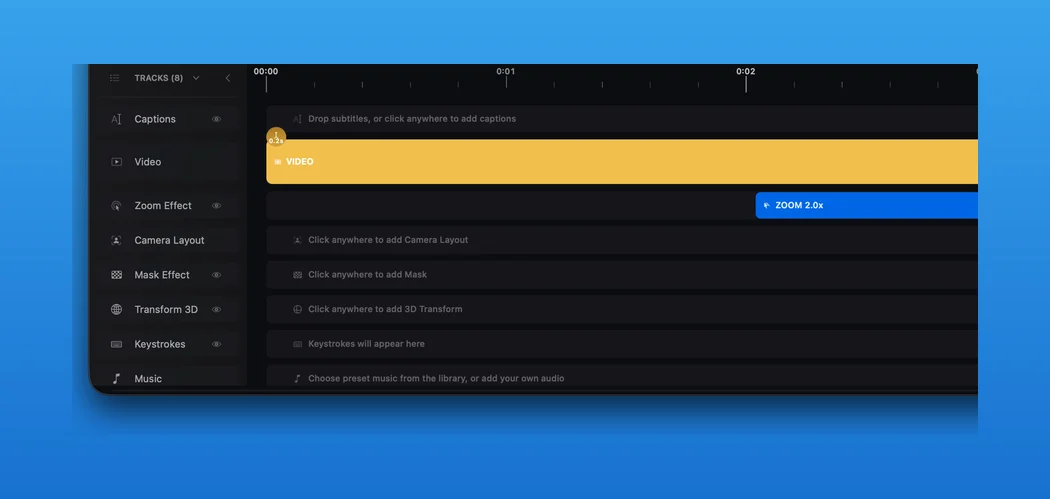
The ScreenSage Pro timeline is made of tracks. Each track owns a specific type of editable content; selecting a range opens the matching Inspector on the right.
What Tracks Do
Tracks keep edits organized:
- Video Track: media clips, trimming, splitting, and base audio.
- Zoom Track: Auto Track, Fixed Center, and Track Text Cursor ranges.
- Caption Track: generated captions, caption segments, styling, import, and export.
- Layout Track: screen, camera, and mobile-device layouts.
- Mask Track: masks, focus, magnify, and marquee borders.
- Transform3D Track: 3D poses, motion actions, and presets.
- Keystroke Track: shortcut and keyboard input overlays.
- Music Track: background music clips and music volume.
Select and Edit
Select a range on a track to edit it in the Inspector, drag its edges to adjust duration, or move it to another point in time.