 ScreenSage Pro
Template Browser
The Template Browser applies common edit structures such as tutorial auto-follow, click highlights, 3D promo motion, Vlog layouts, talking-head smart clipping, and Flash intros.
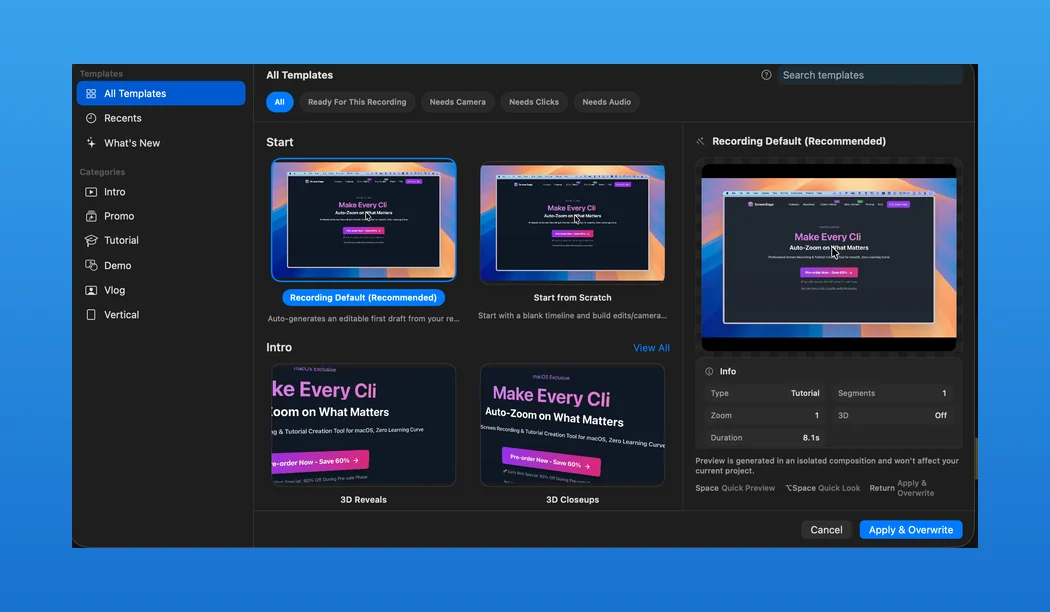
Included Templates
| Category | What it helps you make | Templates |
|---|---|---|
| Start | A useful first draft or a blank edit | Recording Default (Recommended), Start from Scratch |
| Intro | Short, music-led openings | Flash Preview, Flash Preview (3D), Flash Cut (2D), Flash Cut (3D) |
| Promo | Beat-led 3D product shots | 3D Reveals, 3D Closeups |
| Tutorial | Follow on-screen operations clearly | Auto Zoom (2D), Auto Zoom (3D), Focus Clicks |
| Demo | Condense clicks into feature highlights | Click Highlights (Quick Cut), Click Highlights (3D), Pan + Zoom (Promo) |
| Vlog | Combine screen, camera, and spoken narration | Picture-in-Picture (PiP), Side-by-side, Camera Only (Talking Head), Corner Cutout, Talking Head Smart Cut |
| Vertical | Rebuild the edit for a 9:16 canvas | Vertical Stacked Layout, Vertical Reveals, Vertical Auto Zoom (2D), Vertical Auto Zoom (3D), Vertical Talking Head Smart Cut |
Some templates also appear under Intro or another related filter. The table groups each template by its primary category.
Browse Templates
Use categories and search to find a template. Template cards can show the use case and requirements such as clicks, audio, camera, or interaction data.
Preview Before Applying
Templates can change timeline clips, zooms, 3D, layouts, masks, music, cursor visibility, or source audio volume. Preview before applying.
Make Beat-synced Flash Cuts
Flash Preview and Flash Cut can analyze the selected music and align generated cuts to its rhythm.
Choose Average for evenly spaced cuts derived from the selected beat interval, or Rhythm to follow the detected onset timing more closely. Use Quick Preview before applying the result. If the audio does not provide enough reliable beat points, ScreenSage Pro falls back to fixed-duration cuts.
Check Requirements
Click-highlight templates need click events, auto-follow templates need interaction paths, talking-head smart clipping needs audio, and Vlog layouts need camera footage for full effect.